


Rhode Island EZPass Login gives you fast, secure access to your toll road account through the official Rhode Island Turnpike and Bridge Authority (RITBA) portal at www.ezpassritba.com. You can check your balance, view past trips, update vehicle data, add payment methods, and pay unpaid tolls from any computer or mobile device. This resource covers the full login process, account creation steps, password reset help, username recovery, troubleshooting tips, mobile app access, and customer service contacts. Use the steps below to reach your account in under one minute and keep your toll road travel running smoothly across the Newport Pell Bridge, Mount Hope Bridge, Jamestown Verrazzano Bridge, and Sakonnet River Bridge.

What Is the Rhode Island EZPass System?
The Rhode Island E-ZPass is an electronic toll collection system run by the Rhode Island Turnpike and Bridge Authority. It lets drivers pay tolls without stopping at a booth. A small transponder mounted on your windshield reads as you drive through a toll plaza. The system charges your prepaid account for the toll amount based on the signal from the device.

Rhode Island joined the EZPass network, which covers 19 states across the eastern United States. Your Rhode Island E-ZPass works on toll roads, bridges, and tunnels in other EZPass member states. The same transponder and account work across state lines with no extra setup. The network includes states from Maine to Illinois to Florida.
Key Benefits of Rhode Island EZPass
- No stopping at toll booths
- Lower toll rates than Pay By Plate for the same bridge
- Works across 19 E-ZPass states with the same transponder
- Online account management available 24 hours a day
- Auto-replenishment so your balance never runs out
- Free transponder for Rhode Island residents
- Resident discount of $0.83 on the Newport Pell Bridge for 2-axle vehicles
- Detailed trip history for tax records and expense reports
Official Rhode Island E-ZPass Login Portal
The official Rhode Island E-ZPass login portal sits at www.ezpassritba.com. This is the only safe place to access your account data. The site uses HTTPS encryption to protect your personal and financial data from hackers. Look for the padlock icon in your browser bar before entering login details on any device.
offical portal: www.ezpassritba.com
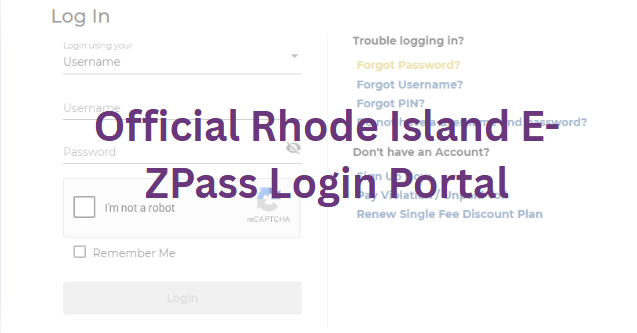
The login page is reached by clicking the “Login” link in the top right corner of the homepage. The direct login URL is www.ezpassritba.com/Login/Login. Bookmark this page on your browser for fast access each time you need to check your account or make changes. The page works on desktop computers, laptops, tablets, and smartphones.
Login Credentials You Need
To complete the Rhode Island EZPass login, you need three things ready before you start:
- Your username (usually the email address you used at signup)
- Your password (set during account creation or changed later)
- A device with internet access (computer, phone, or tablet)
If you do not have these ready, scroll down to the password reset and username recovery sections. Both offer quick fixes for lost login data and walk you through each click.
Rhode Island EZPass Login Process: Steps
The Rhode Island E-ZPass login process takes under one minute once you know the steps. Follow this path to reach your account dashboard from any modern browser.
Step 1: Open the Login Page
- Open a web browser like Chrome, Firefox, Edge, or Safari
- Type www.ezpassritba.com in the address bar at the top
- Press the Enter key on your keyboard to load the homepage
- Click the “Login” button in the top right corner of the page
- Wait for the secure login page to fully load
Step 2: Type Your Username
- Click inside the first box on the login form
- Type your full username or registered email address
- Check the spelling and spacing carefully before moving on
- Usernames are case-sensitive in most cases, so type them as set
Step 3: Type Your Password
- Click inside the second box on the login form
- Type your password exactly as you set it during signup
- Passwords are case-sensitive and symbol-sensitive
- Watch for typing errors in long passwords with mixed characters
Step 4: Complete the Security Check
- A CAPTCHA image or puzzle may appear on the screen
- Click the matching images or type the letters and numbers shown
- This step blocks automated bots from stealing account credentials
- It only takes 5 to 10 seconds to complete the check
Step 5: Click the Login Button
- Click the blue “Log In” button at the bottom of the form
- Wait 2 to 3 seconds for the system to check your details
- Your account dashboard will load with your current account data
- A welcome message shows your name and current balance
Step 6: Start Managing Your Account
Once logged in, you can see your current balance, recent trips, unpaid tolls, and account alerts. The top menu gives you access to vehicles, payment methods, transponder settings, statements, violations, and customer support links. Click any menu item to open that section of your account.
Create a New Rhode Island EZPass Account
You need an account before you can log in for the first time. New accounts take about 10 to 15 minutes to set up online. You can sign up at www.ezpassritba.com or in person at the Jamestown Customer Service Center at 23 America’s Cup Ave. The in-person option is good for drivers who want help with the signup form.
Documents and Data Needed for Signup
Have these items ready before you start the signup process to avoid interruptions:
- Full legal name and Rhode Island street address
- A working email address for account verification and alerts
- A contact phone number for security checks and customer service
- License plate number, state, make, model, and year for each vehicle
- Credit card, debit card, or bank account for the opening deposit
- A security question and answer of your choice
Steps Account Creation: Step 1: Visit the Signup Page
- Go to www.ezpassritba.com in your web browser
- Click the “Sign Up Now” button on the homepage
- Or click “Get EZPass” in the main top menu
- Choose “Personal” or “Business” account type
Step 2: Choose Account Type
- Personal Account: for individual drivers and families with up to 4 vehicles
- Business Account: for company vehicles and fleets with up to 100 vehicles
- Motorcycle Account: for two-wheeled vehicles with weatherproof transponders
Step 3: Enter Personal Details
- Type your full legal name as it appears on your driver’s license
- Type your home or business street address, city, state, and ZIP code
- Type your email address twice to confirm spelling
- Type your daytime phone number and evening phone number if needed
- Choose a security question from the dropdown list
- Type the answer to the security question in the box
Step 4: Add Vehicle Details
- Type the license plate number with no spaces or dashes
- Select the state of registration from the dropdown list
- Type the make (Ford, Toyota, Honda, etc.)
- Type the model (F-150, Camry, Civic, etc.)
- Type the year of the vehicle using 4 digits
- Add up to four vehicles per personal account at signup
- You can add more vehicles later through the dashboard
Step 5: Choose Payment Method
- Credit card: Visa, MasterCard, Discover, or American Express accepted
- Debit card: with a Visa or MasterCard logo on the front
- Bank account: for ACH transfers with no added fees
- Set the initial balance amount ($10 minimum, $40 recommended for most drivers)
- Type the card number, expiration date, and security code
Step 6: Set Auto-Replenishment
- Pick a low balance trigger (the amount that starts a refill, like $10)
- Pick a refill amount (the money added each time, like $40)
- Auto-replenishment stops your balance from going negative on a trip
- You get an email alert each time auto-replenishment runs
Step 7: Order a Transponder
- Rhode Island residents get a free standard transponder
- Out-of-state drivers pay a $10 fee per transponder
- Transponders ship in 7 to 10 business days after signup
- Choose interior mount (most cars) or exterior mount (trucks, motorcycles)
- Each vehicle on your account needs its own transponder for the best rate
Step 8: Submit and Verify
- Review all the data you entered on the final review page
- Check the box to accept the RITBA terms of service and privacy policy
- Complete the CAPTCHA check to prove you are a real person
- Click the “Submit” button to finish the signup process
- Check your email inbox for a verification message from RITBA
- Click the link in the email to activate your new account
- Your temporary username and account number arrive in the same email
Rhode Island EZPass Password Reset
Forgot your password? The Rhode Island E-ZPass password reset process takes about 2 minutes from start to finish. You need access to the email address linked to your account for the reset link to arrive.
Steps to Reset Your Password
- Go to www.ezpassritba.com/Login/Login in your web browser
- Click the “Forgot Password?” link below the login form
- Type your username or registered email address in the box
- Click the “Submit” button to send the reset link
- Open your email inbox and look for the RITBA message
- Click the password reset link in the message from RITBA
- Type your new password twice in the two boxes shown
- Click the “Save” button to finish the reset process
- Return to the login page and sign in with the new password
Password Rules for Rhode Island EZPass
Your new password must meet these rules to be accepted by the system:
- At least 8 characters long in total
- At least one uppercase letter (A, B, C through Z)
- At least one lowercase letter (a, b, c through z)
- At least one number (0, 1, 2 through 9)
- At least one symbol (!, @, #, $, %, etc.)
- No spaces anywhere in the password
What to Do If the Reset Email Does Not Arrive
- Wait 5 to 10 minutes for the email to come through the system
- Check your spam, junk, or clutter folder in your email client
- Add the RITBA email address to your safe senders list
- Make sure your email inbox is not full and blocking new messages
- Try the reset process again with a different email address if you have one
- Call RITBA customer service at 1-877-682-7727 for live phone help
Recover a Forgotten Username
Forgot your Rhode Island EZPass username? The recovery process is fast and simple. You can get a reminder sent to your email or look up your account number on past statements.
Steps to Find Your Username
- Go to www.ezpassritba.com/Login/Login in your web browser
- Click the “Forgot Username?” link below the login form
- Type the email address linked to your account
- Or type your 11-digit account number from a past statement
- Click the “Submit” button to send the username reminder
- Open your email inbox and find the message from RITBA
- Your username appears in the body of the email
- Return to the login page and sign in with the recovered username
How to Find Your Account Number
If you do not know your account number, check these common places:
- Old email messages from RITBA about tolls or balance alerts
- Paper statements mailed to your home in past months
- The sticker on the original transponder box at signup
- Your bank’s billing records if you paid by ACH transfer
Call 1-877-682-7727 if you cannot find your account number through any of these methods. The support team can look up your account with your name, address, and email.
Rhode Island EZPass Login Issues
Most login problems come from forgotten details, browser issues, or account locks. Use this list to fix the most common errors before calling customer support. Each fix takes under 5 minutes to try.
Issue 1: Account Locked After Too Many Failed Attempts
After 5 failed login attempts in a row, your account locks for 15 minutes for safety. This stops hackers from guessing your password over and over. Wait 15 minutes and try again with the correct password. Use the password reset link to set a new password if you keep failing. The lockout clears on its own with no extra steps.
Issue 2: Browser Cache and Cookie Problems
Old data stored in your browser can block the login page from loading right. Clear your cache and cookies to fix this common problem:
- Chrome: Settings → Privacy and Security → Clear Browsing Data
- Firefox: Options → Privacy and Security → Clear Data
- Edge: Settings → Privacy → Clear Browsing Data
- Safari: Develop menu → Empty Caches
Or try a private or incognito window to load the page without stored data. This is a fast way to test if your cache is the problem.
Issue 3: Outdated Browser Version
The login page works best on the latest versions of Chrome, Firefox, Edge, and Safari. Update your browser if you have not done so in the last 6 months. Old browsers may not support the modern JavaScript and security features the site needs.
Issue 4: Pop-Up Blocker Blocking the Login
Your browser pop-up blocker may stop the CAPTCHA window or login form from opening. Allow pop-ups for ezpassritba.com in your browser settings to fix this. Look in your browser’s site permissions or settings menu for the pop-up controls.
Issue 5: Internet Connection Drops
A weak Wi-Fi signal or slow data connection can cause login timeouts. Switch to a different network, restart your router, or move closer to your access point. Public Wi-Fi at coffee shops or hotels sometimes blocks secure sites, so a mobile data plan can help.
Issue 6: JavaScript Turned Off
The login form needs JavaScript to work on the page. Check your browser settings and turn on JavaScript for the ezpassritba.com domain. Most browsers have JavaScript on by default, so this is rare but worth checking.
Issue 7: Mobile Device Compatibility
Older phones and tablets may not load the full desktop site. Update your device operating system or download the free EZ Tolls RI app from the App Store or Google Play. The mobile app has the same account tools and works on older devices.
Issue 8: Wrong Login Page URL
Scammers build fake login pages on similar domain names. Always type www.ezpassritba.com by hand in your browser bar. The only correct login URL is www.ezpassritba.com/Login/Login. Any other URL with extra words, dashes, or numbers is a scam site.
Issue 9: Browser Extension Conflicts
Ad blockers, password managers, and security extensions can sometimes block login forms. Turn off extensions one at a time to find the one causing the problem. A clean browser in incognito mode bypasses all extensions for testing.
Issue 10: Server Maintenance Downtime
RITBA takes the login system offline for maintenance a few times each year. Maintenance usually happens late at night or early in the morning. Try again in a few hours. Check the RITBA website banner for maintenance notices.
Avoid Scams and Fake Rhode Island EZPass Sites
Scammers send fake text messages and emails about unpaid tolls. These messages include links to fake sites that steal credit card data and personal data. RITBA never asks for payment through text messages or links in emails. The only safe place to pay is the official portal.
Scam Tactics
- Fake text messages about unpaid tolls from “E-ZPass” or “RITBA”
- Emails with PDF attachments claiming you owe a small toll amount
- Phone calls from fake customer service agents asking for payment
- Pop-up ads on websites claiming your computer has a virus
- Search engine ads that look like the real site but use a fake URL
Signs of a Scam Message
- Urgent language about a “final notice” or “account closure”
- Misspelled words and bad grammar in the message body
- Links to sites that are not exactly ezpassritba.com
- Requests for payment through gift cards or wire transfers
- Phone numbers that do not match the official 1-877-682-7727 number
- Spoofed sender email addresses that look close to the real one
What to Do If You Get a Scam Message
- Do not click any links in the message body
- Do not reply to the sender or send any personal data
- Do not call any phone numbers listed in the message
- Forward the text message to 7726 (SPAM) to report it to your phone carrier
- Forward email scams to the FTC at [email protected]
- Delete the message from your phone or computer
- Log in to your account at www.ezpassritba.com (type the URL by hand) to check for real unpaid tolls
Real RITBA Contact Points
The only real RITBA contact points are:
- Website: www.ezpassritba.com (type the URL by hand)
- Phone: 1-877-682-7727 (Monday to Friday, 8 AM to 6 PM ET)
- Email: the address listed on the official website contact page
- Mail: 23 America’s Cup Ave, Jamestown, RI 02835
Rhode Island EZPass Account Management Features
Your account dashboard gives you full control over your toll road data. Here is what you can do after logging in with your username and password.
Check Your Account Balance
Your current balance appears at the top of the dashboard in large numbers. The number is the money left in your prepaid account. You need a positive balance to pay tolls at the standard rate. A negative balance means you owe RITBA money and need to add funds.
View Recent Transactions
Click “Transactions” or “Trip History” in the menu to see a list of recent tolls. Each entry shows:
- Date and time of the toll charge
- Bridge or road name where the toll was charged
- Toll amount charged to your account
- License plate or transponder number used for the toll
Update Personal Information
Click “Profile” or “Account Settings” to change your name, address, email, or phone number. Save the new data before logging out of the session. Changes take effect right away for future tolls and customer service calls.
Add or Remove Vehicles
Click “Vehicles” in the menu. Type the new license plate, state, make, model, and year. Click “Add Vehicle” to save the new entry. To remove a vehicle, click the trash icon next to the plate number. You can have up to 4 vehicles per personal account.
Update Payment Methods
Click “Payment Methods” or “Funding Source” in the menu. Add a new credit card, debit card, or bank account. Remove old cards by clicking the trash icon. The new payment method becomes the default for auto-replenishment and one-time payments.
Set Auto-Replenishment Amounts
Pick the dollar amount that triggers a refill (called the “low balance threshold”) and the amount added each time. choices are $10 low balance with $40 refill, or $20 low balance with $50 refill. Higher refill amounts mean fewer transactions but a bigger balance at risk if the account is hacked.
Order a New Transponder
Click “Transponders” in the menu. Click “Order New Transponder” and follow the prompts. Rhode Island residents pay $0 for the device. Out-of-state drivers pay $10 per transponder. Shipping takes 7 to 10 business days from the order date.
Report a Lost or Stolen Transponder
Call 1-877-682-7727 right away to report a lost or stolen transponder. RITBA deactivates the old one and ships a free replacement to Rhode Island residents. The lost transponder cannot be used to charge your account once it is reported. A police report may be needed for fraud claims.
Update Email and Phone for Alerts
Click “Notifications” or “Alert Settings” to choose which alerts you receive. alerts include low balance warnings, payment confirmations, auto-replenishment notices, and login from a new device. You can turn alerts on or off for email and text messages.
Download Tax Statements
Click “Statements” in the menu to see past monthly statements. Click “Download” next to any month to save a PDF or CSV file. The CSV format works with Excel and QuickBooks for business expense tracking.
Close Your Account
To close your account, call customer service or send a written request by mail. RITBA refunds the remaining balance by check or by credit to your original payment method. Refunds take 30 to 45 days to process. Outstanding violations must be paid before the account can be closed.
Rhode Island Toll Roads and Bridges
Rhode Island has four toll bridges run by RITBA. Your EZPass works on all of them. The state moved to all-electronic tolling, so no cash is accepted at any toll facility. Drivers without E-ZPass use the Pay By Plate system with a mailed bill.
Newport Pell Bridge
The Newport Pell Bridge connects Jamestown and Newport over Narragansett Bay. It opened in 1969 and is the most-used toll facility in Rhode Island. The bridge carries Route 138 and is the only road link to Newport from the mainland. The current toll rates are listed below.
| Vehicle Type | Resident E-ZPass Rate | Non-Resident E-ZPass Rate | Pay By Plate Rate |
|---|---|---|---|
| 2-Axle Car | $0.83 | $4.00 | $6.00 |
| 3-Axle Vehicle | $1.25 | $6.00 | $9.00 |
| 4-Axle Vehicle | $1.66 | $8.00 | $12.00 |
| 5-Axle Vehicle | $2.08 | $10.00 | $15.00 |
Rhode Island residents who live in Newport or Jamestown get the $0.83 discount. You must register your license plate with proof of residency to qualify. Proof can be a driver’s license, vehicle registration, or utility bill with your Rhode Island address.
Jamestown Verrazzano Bridge
The Jamestown Verrazzano Bridge carries Route 138 over the west passage of Narragansett Bay. It opened in 1992 and connects North Kingstown to Jamestown. The toll rate is the same as the Newport Pell Bridge for each vehicle class. E-ZPass is accepted at highway speed with no need to stop at a booth.
Mount Hope Bridge
The Mount Hope Bridge carries Route 114 over the Mount Hope Bay between Bristol and Portsmouth. It opened in 1929 and is a steel suspension bridge. The toll rate follows the same schedule as the Newport Pell Bridge. RITBA operates the tolling system on this bridge.
Sakonnet River Bridge
The Sakonnet River Bridge carries Route 24 over the Sakonnet River between Tiverton and Portsmouth. The original bridge opened in 1956 and was replaced with a new span in 2012. The toll rate is the same as the other RITBA bridges. Drivers with an EZPass pay the standard rate based on their vehicle class.
How to Get the Rhode Island Resident Discount
- Sign up for a Rhode Island E-ZPass account at www.ezpassritba.com
- Provide proof of Rhode Island residency (driver’s license, utility bill, or lease)
- Register your license plate number with the account
- Use your E-ZPass transponder at the toll booth
- The $0.83 rate applies automatically at the Newport Pell Bridge
Pay By Plate Option for Out-of-State Drivers
Drivers without a Rhode Island EZPass can still use the toll road. Cameras take a picture of your license plate as you drive through. RITBA looks up the plate in the state DMV database and mails a bill to the registered owner. The Pay By Plate rate is higher than the E-ZPass rate. You can also log in to www.ezpassritba.com to view and pay Pay By Plate invoices before they become violations.
Rhode Island EZPass Discount Plans
RITBA offers several discount plans for frequent drivers and Rhode Island residents. These plans lower the cost of regular toll travel across the state bridges.
Resident Discount Program
Rhode Island residents pay $0.83 for a 2-axle vehicle on the Newport Pell Bridge. Non-residents pay $4.00 with E-ZPass or $6.00 with Pay By Plate. The discount applies to any vehicle registered to a Rhode Island address. You must provide proof of residency to qualify for the discount rate.
Volume Discount for Frequent Users
Drivers who use the Newport Pell Bridge more than 20 times per month may qualify for extra discounts. Call 1-877-682-7727 to ask about the frequent user program. The discount applies to your account after you meet the trip count in a calendar month.
Pay By Plate Monthly Cap
Out-of-state drivers who use Pay By Plate get a monthly cap on the total toll charges. The cap limits how much you pay for repeat trips over the same bridge in a 30-day period. Log in to your Pay By Plate account to see the cap amount for your vehicle class.
E-ZPass Transponder Types and Installation
The transponder is the small device that mounts on your windshield. It sends a radio signal to the toll reader as you drive through the plaza. The reader charges your account based on the signal. The transponder is also called an EZPass tag, EZPass sticker, or EZPass unit.
Types of Transponders
- Interior transponder: mounts on the inside of the windshield, behind the rearview mirror
- Exterior transponder: mounts on the outside of the vehicle, often on the front bumper or roof
- Motorcycle transponder: a weatherproof model for two-wheeled vehicles
- Sticker transponder: a thin adhesive version for permanent mounting
Rhode Island E-ZPass uses the standard EZPass transponder, which works in all 19 EZPass member states. The same transponder reads in New York, Massachusetts, Connecticut, Maine, and other states with no setup changes.
How to Install an Interior Transponder
- Clean the inside of the windshield with glass cleaner
- Let the glass dry completely before mounting
- Peel the backing off the transponder mount strip
- Place the transponder behind the rearview mirror, about 2 inches below the roof
- Press firmly for 30 seconds to set the adhesive
- Wait 24 hours before driving so the adhesive cures fully
How to Install an Exterior Transponder
- Clean the mounting surface on the front bumper or roof
- Use the included screws or strong adhesive tape
- Mount the transponder in a level position facing forward
- Make sure the transponder has a clear line of sight to the sky
- Connect the power cable to a 12V power source if needed
Transponder Battery Life
Most interior transponders have a non-replaceable battery that lasts 7 to 10 years. When the battery dies, RITBA mails a free replacement to Rhode Island residents. The old transponder must be returned to RITBA or destroyed. Sticker transponders have no battery and last for the life of the vehicle.
What to Do If Your Transponder Stops Working
- Check that the transponder is mounted in the right spot
- Make sure the mounting location has no metal tinting blocking the signal
- Check the toll history online to see if the toll was charged
- Call 1-877-682-7727 to test the transponder over the phone
- Request a replacement if the unit is broken or expired
Transponder Replacement Cost
| Driver Type | Standard Replacement | Damaged/Lost Replacement |
|---|---|---|
| Rhode Island Resident | $0.00 (free) | $10.00 |
| Out-of-State Driver | $10.00 | $20.00 |
| Business Account | $10.00 per unit | $25.00 per unit |
Mobile App: EZ Tolls RI
The EZ Tolls RI app is the official mobile app for Rhode Island E-ZPass. It works on iPhone and Android phones. You can log in to your account, check your balance, pay tolls, and manage vehicles from the app. The app is a fast alternative to typing the URL on a phone browser.
How to Download the App
- iPhone: open the App Store, search “EZ Tolls RI”, tap “Get”
- Android: open Google Play, search “EZ Tolls RI”, tap “Install”
- The app is free to download on both platforms
- App size is about 30 MB, fast install on most devices
App Login Process
- Open the EZ Tolls RI app on your phone
- Tap “Login” on the home screen
- Type your username and password in the boxes
- Tap “Sign In” to reach your account dashboard
- You can enable fingerprint or face login for faster access next time
App Features
- View account balance in real time after login
- See recent toll transactions for the past 90 days
- Pay unpaid tolls and violations with a saved card
- Update vehicle and payment data on the go
- Receive low balance alerts as push notifications
- Find nearby customer service centers with map directions
- Contact support through the in-app messaging tool
- View and download monthly statements as PDF files
App Login Troubleshooting
Most app login issues come from old app versions or wrong passwords. Update the app to the latest version in your app store. Reset your password through the website if the app keeps saying the password is wrong. The app and website use the same account, so a password reset on one fixes the other.
Payment Methods Accepted
RITBA accepts several payment methods for the initial deposit, auto-replenishment, and toll invoices. Choose the option that works best for your budget and banking setup.
Credit and Debit Cards
All major card networks work on the RITBA portal and mobile app:
- Visa
- MasterCard
- Discover
- American Express
Card payments post to your account right away. A small convenience fee may apply to some one-time payments made by phone. Online and auto-replenishment payments have no added fee.
Bank Account (ACH Transfer)
Linking a checking or savings account is free with no added fees. ACH transfers take 1 to 3 business days to post to your account. You need your bank routing number and account number to set up ACH. Most U.S. banks support ACH transfers for EZPass auto-replenishment.
Cash Payments
Cash payments are accepted at these locations:
- The Jamestown E-ZPass Customer Service Center at 23 America’s Cup Ave
- AAA branches across Rhode Island
- Some participating retail stores with PayNearMe or similar services
Check or Money Order
Mail checks or money orders to the RITBA office for account funding. Make the payment out to “Rhode Island Turnpike and Bridge Authority”. Include your account number on the check memo line so the payment posts to the right account. Mail the check to 23 America’s Cup Ave, Jamestown, RI 02835.
Rhode Island EZPass Violations and Fees
If you drive through a toll without a transponder or registered plate, you get a violation in the mail. The violation has a higher fee than the regular toll rate. Pay the violation on time to avoid extra fees and collections actions.
Violation Fee Schedule
| Violation Type | Fee Amount |
|---|---|
| First unpaid toll notice | $6.00 plus the toll amount |
| Second unpaid toll notice | $25.00 administrative fee |
| Third and later unpaid tolls | $50.00 administrative fee per toll |
| Failure to pay within 30 days | Collections process and additional fees up to $250 |
| Failure to pay after court action | License and registration suspension possible |
How to Pay a Violation
- Open www.ezpassritba.com and log in to your account
- Click “Violations” in the main menu
- Review the list of unpaid tolls and added fees
- Click “Pay Now” next to each violation you want to pay
- Choose your payment method from the dropdown list
- Click “Submit” to complete the payment transaction
- Save the confirmation number for your tax records
How to Dispute a Violation
You have 30 days to dispute a violation in writing. Send a dispute letter to the RITBA office at 23 America’s Cup Ave, Jamestown, RI 02835. Include these items in the letter:
- Your full name and account number
- The violation number from the notice you received
- A copy of the original violation notice
- Proof that the toll was paid (receipt, transponder record, or bank statement)
- Your contact phone number and email address
RITBA reviews the dispute and sends a written response within 30 days. If the dispute is approved, the violation is removed from your account and the fee is refunded. If the dispute is denied, you can request a hearing through the Rhode Island courts.
Monthly Statements and Tax Records
RITBA mails paper statements to all account holders each month. The statement shows a list of every transaction on your account for the billing cycle. The statement arrives at the start of the following month.
What Appears on Your Monthly Statement
- All toll transactions for the month, listed by date
- Total toll charges for the billing period
- Account balance at the start of the month
- Account balance at the end of the month
- Auto-replenishment activity and added funds
- Any unpaid violations and added fees
- Payments received during the month
Paperless Statements
You can switch to paperless statements in your account settings. Paperless statements come by email and save paper. The PDF attachment has the same data as the paper version. You can download past statements anytime from the dashboard.
Tax-Ready Statement Downloads
Business account holders can download statements in PDF or CSV format for expense reports and tax records. Log in to your account and click “Statements” to download past months. The CSV format works with Excel, QuickBooks, and other accounting software for easy import.
Rhode Island EZPass for Businesses
Business accounts let companies track toll expenses by vehicle and driver. The account owner can add up to 100 vehicles to a single business account. Each vehicle has its own transponder and detailed usage record. The system tracks every toll across every vehicle for clean reporting.
Business Account Features
- Bulk vehicle management with batch uploads from a CSV file
- Detailed usage reports by vehicle, driver, or department
- Department-level billing for cost center tracking
- Tax-ready monthly statements in PDF and CSV formats
- Dedicated customer service line for business accounts
- Centralized payment for all vehicles in one bill
- Custom user roles for fleet managers and accountants
How to Set Up a Business Account
- Go to www.ezpassritba.com and click “Business Sign Up”
- Provide your company name, federal tax ID, and billing address
- Add contact details for the account manager
- Choose the funding source (business credit card or bank account)
- Add vehicle data for each fleet vehicle
- Order transponders for each vehicle ($10 per unit)
- Pay the initial deposit ($40 per vehicle recommended)
Out-of-State EZPass Users
Drivers from other EZPass states can use their home transponder on Rhode Island toll roads. The system charges your home account at the Rhode Island rate. No extra account is needed. The EZPass network handles all the billing between state agencies.
For example, a New York EZPass holder drives over the Newport Pell Bridge. The toll is charged to the New York account. The trip shows up in the New York E-ZPass trip history within 24 to 48 hours. The rate depends on the EZPass agreement between the two states.
Out-of-State Resident Rates
Drivers with out-of-state EZPass accounts pay the non-resident rate on the Newport Pell Bridge. The current rate is $4.00 for a 2-axle vehicle. Pay By Plate out-of-state drivers pay $6.00. Larger vehicles pay higher rates based on the number of axles.
How to Check Your Out-of-State EZPass Balance
Log in to your home state E-ZPass portal to check your balance. Rhode Island tolls show up as line items in your trip history. For example, a Massachusetts E-ZPass user logs in to the MassDOT EZPass portal to see Rhode Island tolls. A New York E-ZPass user logs in to the Thruway Authority portal.
Out-of-State Driver Customer Service
If you have questions about a Rhode Island toll charged to your out-of-state EZPass, call your home state E-ZPass customer service line first. They handle all billing questions for out-of-state trips. Rhode Island RITBA customer service can answer questions about specific Rhode Island toll rates and discount plans.
Rhode Island EZPass Customer Service Contact
RITBA runs a full customer service operation for EZPass users. Pick the contact method that works best for your needs and the urgency of the question.
Phone Support
Call RITBA customer service at 1-877-682-7727. Phone lines are open Monday through Friday from 8 AM to 6 PM Eastern Time. The average wait time is under 5 minutes during business hours. The line is closed on weekends and federal holidays. For after-hours support, use the online portal or send an email.
Walk-In Customer Service Center
Visit the Jamestown EZPass Customer Service Center at 23 America’s Cup Ave, Jamestown, RI 02835. Walk-in hours are Monday through Friday from 8 AM to 4 PM. The center offers these services:
- New account signup with on-site help
- Transponder pickup and replacement
- Cash payments for tolls and violations
- In-person account help for complex issues
- Dispute filing and review
Email Support
Send non-urgent questions to the email address on the official website. The support team responds within 1 to 2 business days. Include your account number and full name in the email subject line for faster service. Attach photos of any relevant documents like transponder damage or payment records.
Mailing Address
Send written correspondence, dispute letters, and check payments to:
Rhode Island Turnpike and Bridge Authority
EZPass Customer Service Center
23 America’s Cup Ave
Jamestown, RI 02835
Official Website
Security and Privacy Best Practices
Keep your Rhode Island EZPass account safe with these tips. Account security starts with your password and ends with your email habits.
Create a Strong Password
Use a long, unique password for your E-ZPass account. A password manager like 1Password, Bitwarden, or LastPass can store the password safely. Never reuse passwords from other sites on your E-ZPass login. A strong password uses a mix of letters, numbers, and symbols with no common words.
Turn On Login Alerts
Log in to your account and turn on email alerts for new device logins. You get an email each time someone signs in to your account from a new device or browser. If you see a login you did not make, change your password right away and call customer service.
Watch for Fake Sites
Always type www.ezpassritba.com in your browser bar. Do not click links in emails or text messages about E-ZPass tolls. The official site is the only safe place to enter login details. Bookmark the page to avoid typing the wrong URL by accident.
Keep Your Email Secure
Your E-ZPass username is often your email address. A hacker who breaks into your email can reset your E-ZPass password. Use a strong email password and turn on two-factor authentication on your email account. Most major email providers support two-factor authentication with an app or text code.
Update Your Contact Data
Keep your email, phone, and mailing address up to date in your EZPass profile. RITBA sends toll bills, low balance alerts, and security notices to the data on file. Old contact data means you miss important messages about unpaid tolls or account changes.
Public Computer Safety
Never log in to your E-ZPass account on a public computer at a library, hotel, or internet cafe. Public computers may have keyloggers that steal your password. If you must use a public computer, use incognito mode and clear all browser data after the session.
Wi-Fi Network Safety
Avoid logging in to your EZPass account on public Wi-Fi networks at coffee shops or airports. These networks can be hacked and your login stolen. Use your phone’s mobile data or a personal hotspot for safe logins away from home.
Frequently Asked Questions
Below are answers to the most common questions about the Rhode Island EZPass login system. Each answer covers a key detail about account access, billing, transponder use, and customer support for the RITBA toll road system.
What Is the Official URL for Rhode Island E-ZPass Login?
The official URL is www.ezpassritba.com/Login/Login. Bookmark this page on your browser to avoid fake scam sites. The site uses HTTPS encryption to protect your login data. You can also log in through the EZ Tolls RI mobile app on iPhone or Android phones. The full portal at www.ezpassritba.com has the same login button in the top right corner of the homepage. RITBA does not use any other web address for E-ZPass access. Clicking links in text messages or emails is risky because scammers copy the real site on fake domains with similar names.
How Long Does the Rhode Island EZPass Login Take?
The login process takes 30 to 60 seconds on a fast internet connection. Type your username and password, complete the CAPTCHA, and click “Log In” to enter the dashboard. The dashboard loads in 2 to 3 seconds on average. Slow networks, outdated browsers, and locked accounts add extra time. A password reset adds 2 to 3 minutes total. The username recovery process adds 1 to 2 minutes. The mobile app login is faster because your phone stores the credentials for next time. Face login and fingerprint login can drop the time to under 10 seconds.
Can I Log In to Multiple Devices at the Same Time?
Yes, the Rhode Island EZPass login system allows multiple active sessions on different devices. You can sign in on your phone, computer, and tablet at the same time with no conflict. Each session works on its own without blocking the others. Logging out of one device does not log out the others. The system only locks the account if there are 5 failed login attempts in a row from any source. This lockout rule is for password safety, not for active sessions. You can stay logged in for hours or days at a time across multiple devices.
Is the Rhode Island EZPass Login Page Safe to Use?
Yes, the official page at www.ezpassritba.com is safe. The site uses a 256-bit SSL certificate for data encryption on all login data. Look for the padlock icon in your browser bar before typing your password. The page has been certified by a major security firm with regular audits. Never type your password on a site that does not have the padlock icon. RITBA never asks for your full password by phone or email. Customer service can verify your identity with partial data, never the full password. Two-factor authentication is not required but is available for business accounts.
What Happens If My Rhode Island EZPass Account Gets Hacked?
Call RITBA at 1-877-682-7727 right away to report the hack to a live agent. The support team freezes the account and reviews recent transactions for fraud. Any tolls charged by the hacker are removed from your account balance. RITBA issues a new account number and password for your next login. You get a new transponder if the old one was linked to the hacked account. RITBA does not hold users liable for tolls charged by hackers once the hack is reported. Time is critical, so call as soon as you notice the breach or see a login alert you did not trigger.
Do I Need a Rhode Island E-ZPass to Drive on Rhode Island Toll Roads?
No, an EZPass is not required for any driver. Rhode Island uses all-electronic tolling, so no cash is accepted at the toll plaza. Drivers without an E-ZPass can use the Pay By Plate option with their license plate. Cameras read the plate and mail a bill to the registered owner of the vehicle. The Pay By Plate rate is higher than the E-ZPass rate. For example, the Newport Pell Bridge costs $4.00 with E-ZPass and $6.00 with Pay By Plate for a 2-axle vehicle. An E-ZPass is the cheaper option for regular users and out-of-state commuters who cross the bridge daily.
Can I Use My Out-of-State EZPass on Rhode Island Toll Roads?
Yes, the Rhode Island E-ZPass system accepts all E-ZPass transponders from the 19 member states. Your home account is charged the toll at the Rhode Island rate through interagency billing. The trip shows up in your home state’s online portal within 24 to 48 hours of the toll. No extra account or setup is needed for out-of-state users. Drivers from Massachusetts, Connecticut, New York, New Jersey, and other E-ZPass states can drive Rhode Island toll roads with the same transponder. The transponder works the same way it does in your home state with no changes needed.
